
AI management for your company. Access and costs under central control.
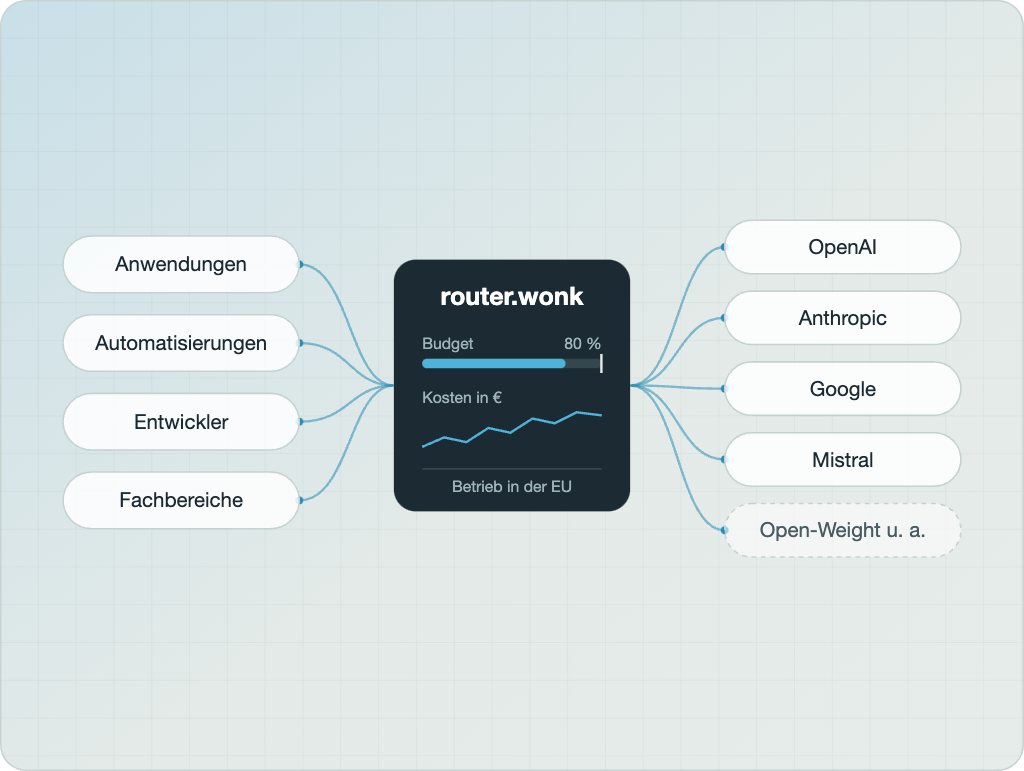
The AI gateway router.wonk bundles access to the models of all relevant providers in one OpenAI-compatible interface, with budgets, approvals and a cost overview in euros, operated in the EU. Your applications, automations and developers as well as business units access it. Every key has a budget and a list of approved models. Before limits are reached, the relevant people are notified. With their hard cap, budgets always protect you against runaway costs.
Problems that arise when AI is used a lot
- Several teams use models from different vendors, each with its own account and its own credit card.
- Controlling only sees AI costs on the invoice and cannot assign them to a project.
- There is no platform team to build your own gateway.
- Data protection requires EU operation and one contract partner instead of many individual contracts.
With router.wonk you manage usage and costs in one place, without building your own tool for it.
What router.wonk does
One interface for all models
The interface is OpenAI-compatible, and every model is addressed by its name. You connect existing applications by swapping the address and the key.
Bring your own keys and accounts (BYOK)
Do you already have keys with model vendors or models in your cloud accounts, for example on Azure or STACKIT? Your developers connect them through the same router and manage them with the same budgets and the same cost overview. Keys are stored encrypted. Processing is governed by the terms of your contract with the respective provider. Available in the Team tier.
Budgets with a hard cap
For the company, per project, per member and per key. Budgets apply monthly and renew automatically. At 80 % the people responsible receive a warning.
Model approvals per key
Every application uses only the models you approve for it.
Fallback models
Your admins can define a replacement model for a model. If the model is unavailable or is being replaced, the router then forwards requests to the replacement model.
Cost overview in euros
At billing prices, by project, member, key and model, with export for controlling. Who sees which costs depends on their role.
Self-service
With the roles owner, admin and member. Your admins create projects, issue keys and distribute the budget without going through us. There is no limit on the number of API keys.
Stores no content
Requests and responses are forwarded, not stored.
Models
With router.wonk you choose from a broad selection of current models from all relevant providers: from OpenAI, Anthropic, Google, Mistral, Microsoft and NVIDIA to numerous open-weight models, for example from DeepSeek, Qwen, Kimi, GLM and MiniMax. That way you use the model that fits each task in performance and price.
In the router you see every model with its billing price and address it by its name. Which models an application may use is set per key.
Every model you obtain via wonk runs exclusively in the EU, without storage at the vendor and without training on your data.
If a model is replaced, we announce it by email. The previous model remains usable under its name for 30 days, as far as the vendor allows. That way you can switch your applications over calmly or set a fallback in the router.
Operations and data protection
- One contract under German law with wonk.ai GmbH, Bielefeld, for all models
- Hosting in Germany, models via wonk exclusively in EU data centres
- Requests and responses are forwarded, not stored
- Stored keys are encrypted
- Data processing agreement with a complete list of subprocessors
- Dedicated contact person, response to critical incidents within 4 hours
Larger projects
For larger companies we go further: models that cannot be connected via an existing key are integrated as a project, so you can manage them through router.wonk as well.
Together with chat.wonk
The router is meant for AI in applications, automations and with developers. If all employees should also work in the chat, add chat.wonk. Individual chat users then receive personal keys with their own budget, and chat and applications appear in one cost overview in euros.
Frequently asked questions
What happens when a budget is used up?
The affected key or project accepts no further requests until the end of the month. Your admins can raise the budget at any time. At 80 % you get a warning beforehand.
Do we have to rebuild our applications?
Usually not. The router speaks the same interface as OpenAI. As a rule you swap the address and the key.
Does router.wonk store our requests?
No. Requests and responses are only forwarded.
How is billing done?
There are two tiers. Both have the same features, and you bring your own keys in the Team tier. Otherwise they differ in how usage is billed. Which tier fits your usage is something we work out with you in a conversation.
Which AI models can I use via router.wonk?
Models from all relevant providers, including OpenAI, Anthropic, Google, Mistral, Microsoft and NVIDIA as well as numerous open-weight models, for example from DeepSeek, Qwen, Kimi, GLM and MiniMax. Which models an application may use is set per key.
What is the difference between router.wonk and chat.wonk?
chat.wonk is the AI chat for every employee, operated by wonk. router.wonk is the interface for applications, automations and developers that you manage yourself. Together, both run on the same budgets and the same cost overview.
Do the models run in the EU, and what about data protection?
Every model you obtain via wonk runs exclusively in the EU, without storage at the vendor and without training on your data. The data processing agreement with a complete list of subprocessors is part of the contract.
Can I use my own API keys?
Yes, in the Team tier. Your developers connect existing keys with model vendors or models in your cloud accounts, for example on Azure or STACKIT, through the same router. Processing is then governed by your contract with the respective provider.
See router.wonk with your use cases
In a no-obligation 30-minute call we show you the router with your applications and work out which tier fits your usage.