


Local AI for SMEs: what works, what does not, and what it takes
Language models running on in-house hardware are powerful enough for many business tasks in 2026. We explain which models and hardware fit, how LibreChat makes them usable, and when cloud, local, or hybrid deployment makes sense.
As of 3 November 2026
Local language models can now run on hardware that is realistic for small and medium-sized companies. Their performance is sufficient for many tasks. Whether local operation is worthwhile depends on the protection needs of the data, the intensity of use, and the available operational capacity.
At a glance
- Open language models are good enough for a large share of office work in 2026: summaries, drafts, questions about internal documents, and extracting data from text.
- A team can often work with one workstation equipped with a capable GPU. A data centre is not required.
- Gemma 4 provides a strong model family under Apache 2.0, allowing commercial use without restrictive model terms.
- LibreChat provides a familiar chat interface for the team while running within the company's own environment.
- A cloud API is often cheaper for occasional use. The specific task and its requirements should determine the choice.
Why run AI locally?
There are three main reasons:
- Data needs to remain in-house. Personnel files, contracts, engineering documents, and customer data. For many companies, this is a requirement rather than a preference. Local deployment does not automatically make a solution compliant, but it reduces the number of external processing relationships that need to be assessed.
- Predictable costs. There is no charge per request and no rising API bill as usage grows. Hardware, electricity, and operational work still need to be included in the calculation.
- Control over versions. A cloud provider can replace or update a model. With local deployment, the company decides when a new model version goes into production.
Where local models stand today
The gap between open models and the strongest cloud models has narrowed considerably over the past two years, but it has not disappeared. It is most apparent in long, multi-step tasks where a model needs to plan independently, use tools, and verify intermediate results.
As a general guide for 2026:
Well suited
- Summaries, translations, and drafts
- Questions about internal documents (RAG)
- Classification and extraction
- Coding assistance for routine tasks
- Tasks involving data that must remain in-house
Still difficult
- Long, multi-step agent tasks
- Reasoning at the level of the strongest cloud models
- Long contexts for many concurrent users
- Current world knowledge without external sources
- Operation without internal IT support
A broad comparison with the strongest available cloud model is of limited value when selecting a system. A test using specific tasks, representative company data, and defined quality criteria is more useful. This shows whether a local model is sufficient for its intended purpose.
For questions about internal documents, document preparation often affects quality more than the model itself. A poorly extracted PDF will not produce reliable answers, even with a capable model.
The models: open, commercially usable, and available in different sizes
| Model family | Provider | Sizes | Licence | Suitable for |
|---|---|---|---|---|
| Gemma 4 | Google, 2026 | E2B, E4B, 12B, 26B-A4B, 31B | Apache 2.0 | General use, multilingual tasks, images, long context |
| gpt-oss | OpenAI, 2025 | 20B, 120B | Apache 2.0 | Reasoning, tool use |
| Mistral Small 4 | Mistral AI, 2026 | 119B (MoE, about 6B active) | Apache 2.0 | European provider, text, images, code |
| Qwen 3.x | Alibaba, 2026 | including 27B | Check each model | Code, multilingual tasks |
Our current choice for an initial deployment is Gemma 4. Google released the family in April 2026 under the Apache 2.0 licence. Earlier Gemma versions had their own terms of use. According to the official model card, the family ranges from models for smartphones to a 31B model for workstations. The medium and larger variants support up to 256,000 context tokens, enough for longer documents.
Gemma 4 26B-A4B is particularly relevant for SMEs. Its name refers to an architecture that needs a brief explanation.
What does MoE mean?
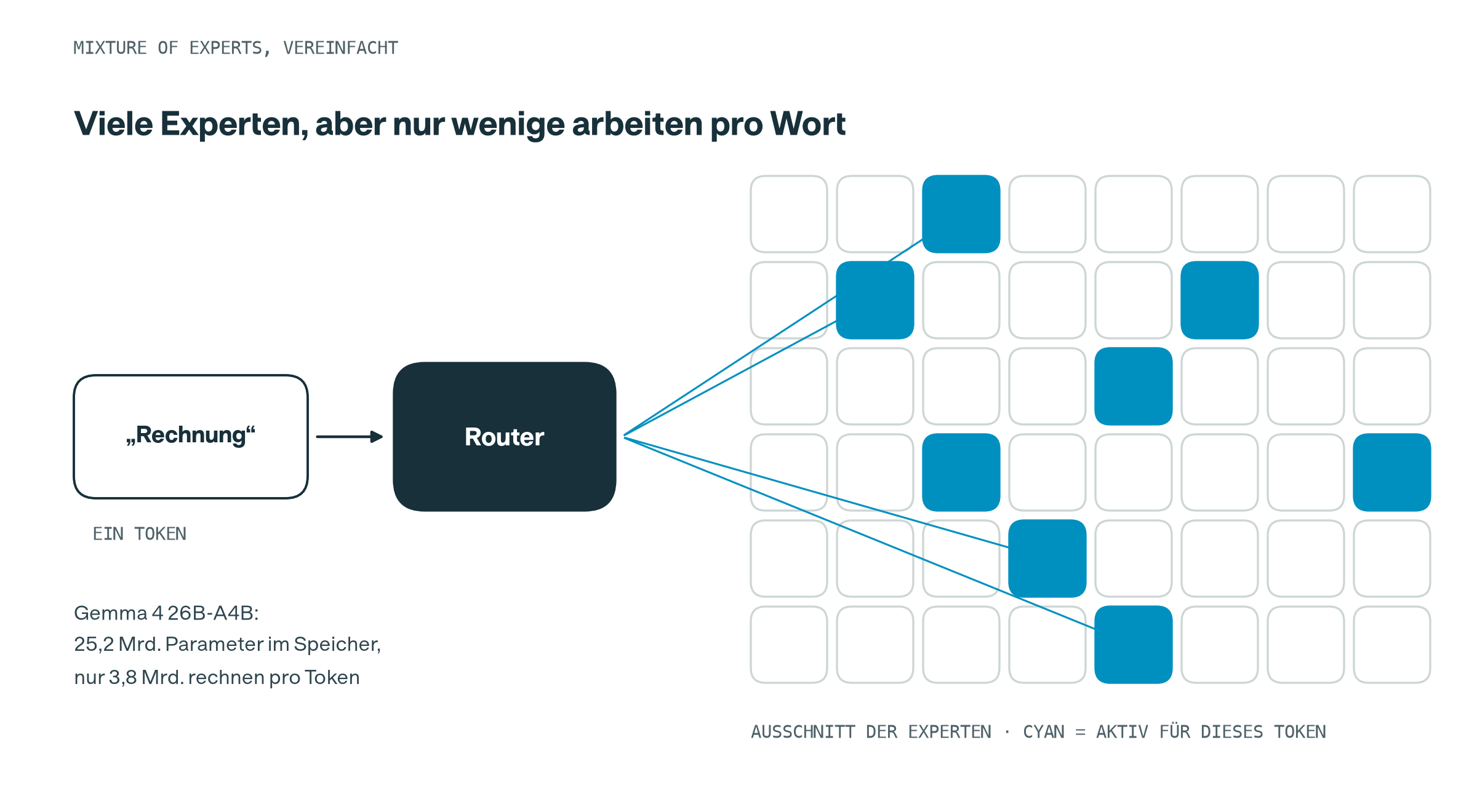
MoE stands for Mixture of Experts. A conventional language model sends every token through all of its parameters. An MoE model divides parts of the network into multiple experts. A router selects the few experts used for each token. The remaining experts are inactive for that token.
Gemma 4 26B-A4B has 25.2 billion parameters in memory, but uses only 3.8 billion for each token. “A4B” means that about 4 billion parameters are active. These experts are not departments specialising in legal or medical topics. They are parts of the network that specialise during training.
In practice:
- Quality is closer to a medium-sized model because the network contains more knowledge.
- Speed is closer to a small model because fewer parameters are used for each token.
- Memory requirements still reflect the full model. MoE reduces computation, not GPU memory.
This combines short response times on a single GPU with the knowledge capacity of a considerably larger network.
What hardware is required?
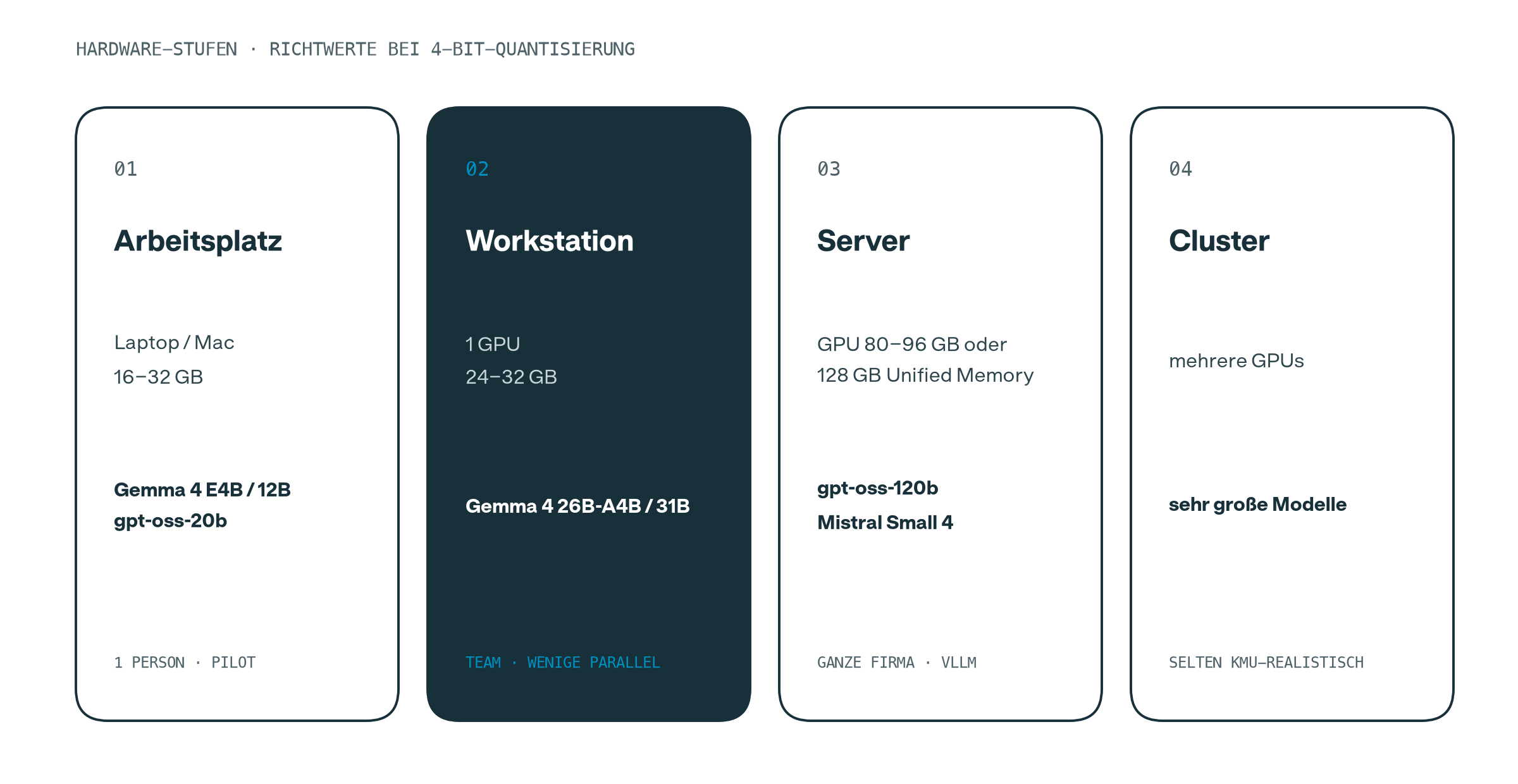
Quantisation compresses models to roughly one third or one quarter of their original size, with a manageable loss in quality. Gemma 4 26B-A4B then occupies about 16 to 19 GB, while the 31B model occupies about 19 to 20 GB.
- A well-equipped laptop or Mac is sufficient for a pilot.
- A team can often use a workstation with one GPU offering 24 to 32 GB of memory. This is enough for Gemma 4 26B-A4B or 31B.
- A server with a large accelerator becomes relevant when many people use the system concurrently or very large models are required.
The main constraint is often the memory required for concurrent requests. Each simultaneous conversation needs additional capacity, especially when long documents are involved. Capacity should therefore be planned according to the expected number of concurrent users.
The interface: LibreChat
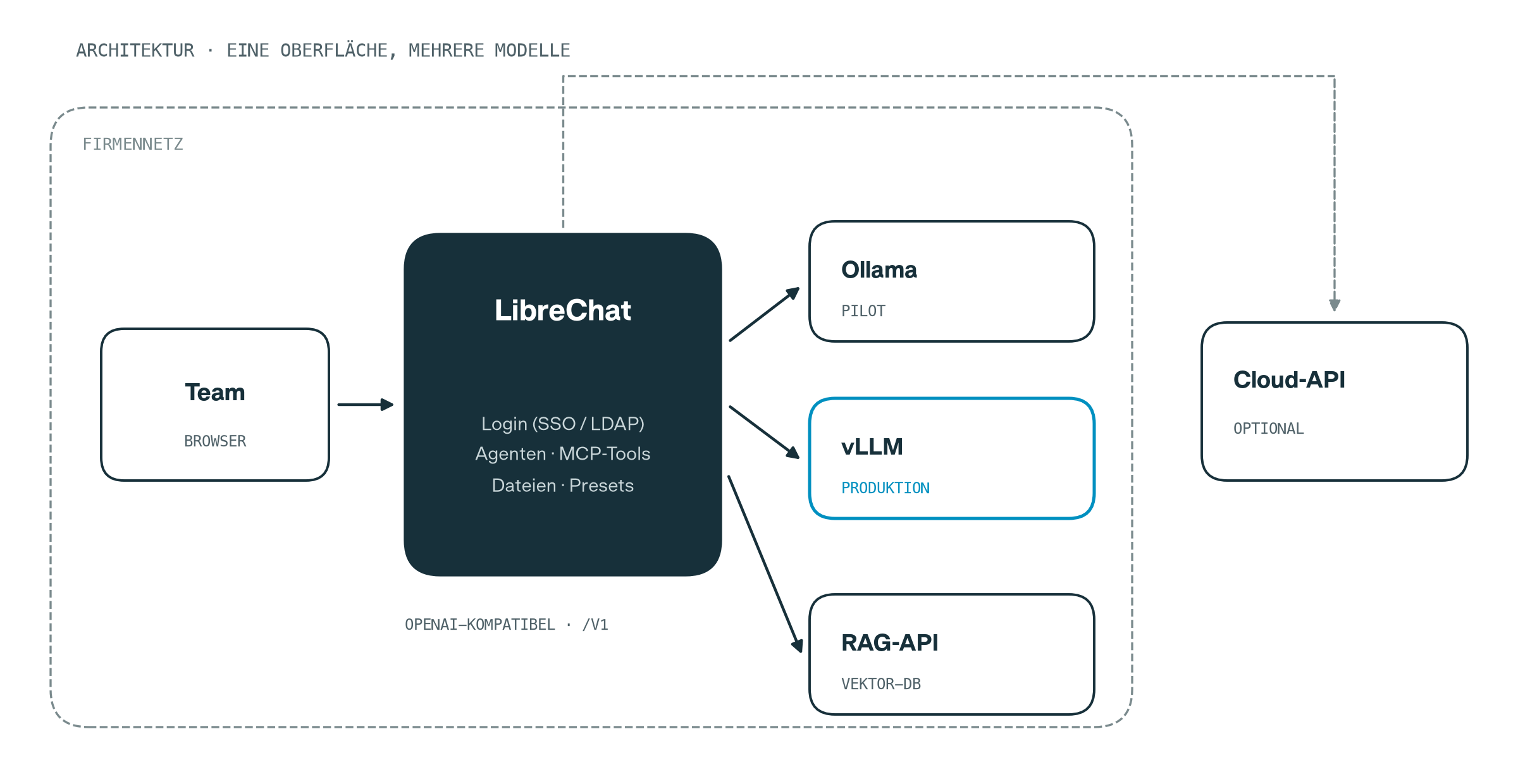
A model alone is not a usable tool for a team. It needs an interface with authentication, conversation history, file uploads, and the ability to create custom assistants. We use LibreChat for this:
- Open source under the MIT licence and self-hosted with Docker.
- One interface for multiple models, combining local models and approved cloud models if required.
- Agents and tools through the Model Context Protocol (MCP), with questions about internal files handled by a separate RAG component.
- Authentication through the existing company environment, such as LDAP or OpenID Connect.
Our article LibreChat as a central AI platform for companies describes the architecture and operation in more detail.
LibreChat communicates with model servers through an OpenAI-compatible interface. We use Ollama for pilots because it is quick to set up. vLLM is suitable for production environments with many concurrent requests. The interface used by the team remains unchanged when switching between them.
The connection can be configured as follows:
endpoints:
  custom:
    - name: "Ollama"
      apiKey: "ollama"
      baseURL: "http://host.docker.internal:11434/v1/"
      models:
        default: ["gemma4:26b"]
        fetch: true
      titleConvo: true
      titleModel: "current_model"
      modelDisplayLabel: "Local (Pilot)"
Ollama does not include authentication by default. When LibreChat runs in Docker, Ollama must be reachable from the container. The Ollama port must not become available across the company network. It should be accessible only to LibreChat and protected by a firewall.
Local, cloud, or hybrid? The decision matrix
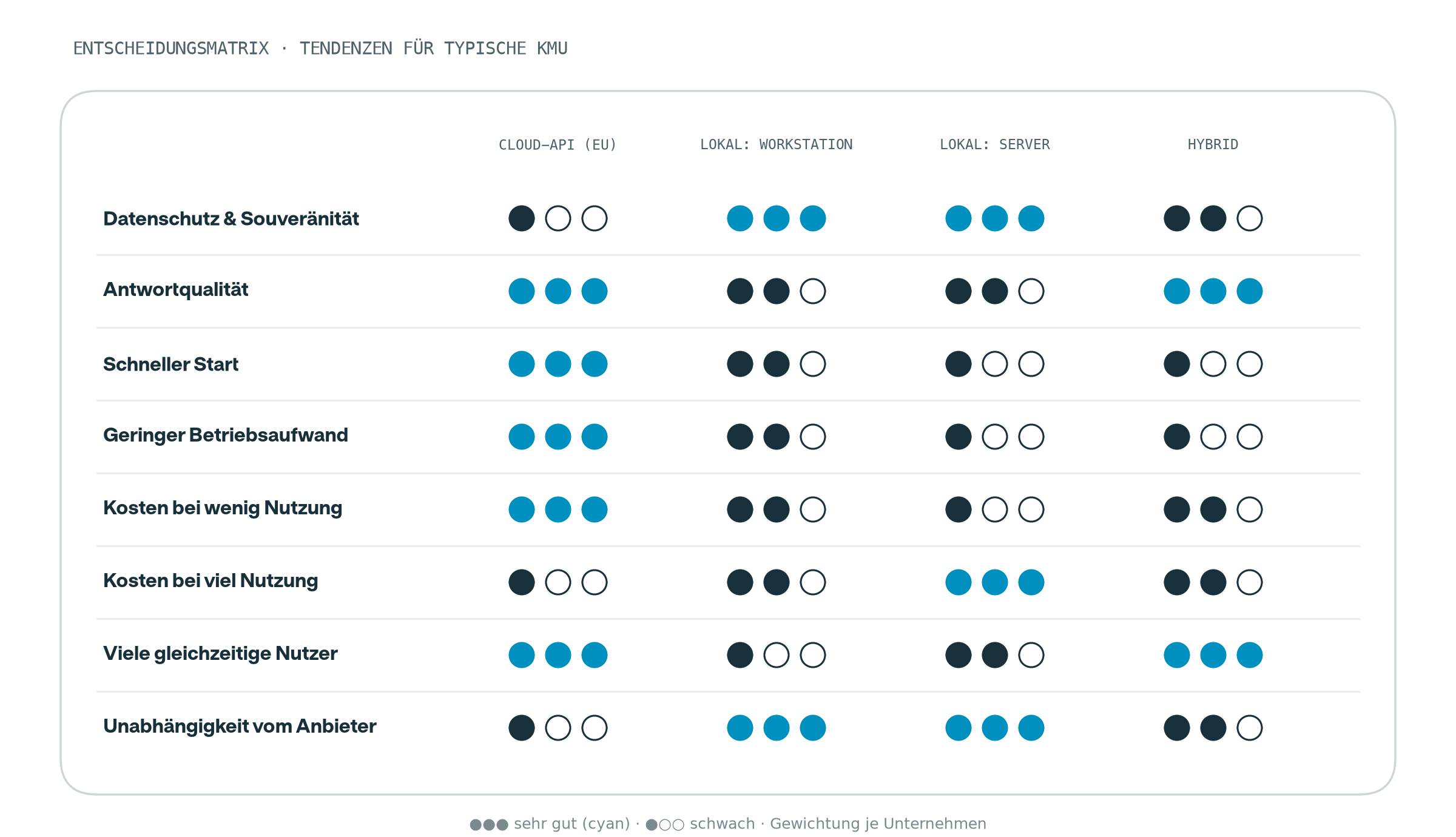
The four deployment models have different strengths:
- A cloud API supports a quick start, requires little operational work, and is cost-effective at low usage. It offers less sovereignty and can become expensive under high, consistent load.
- A local workstation is a practical starting point for teams, offering greater sovereignty at a manageable cost.
- A local server can be cost-effective for many users and high utilisation, but requires operational expertise.
- A hybrid setup handles sensitive tasks locally and approved tasks in the cloud. This can combine the benefits of both approaches, but requires clear routing rules.
The weighting of these criteria determines the choice. For sensitive data, sovereignty may be a mandatory requirement. A company that prioritises speed of implementation will weight the criteria differently.
Our implementation plan
- Define use cases. Select two or three specific tasks and prepare test questions with expected answers.
- Design and set up a pilot. Combine suitable hardware, a model server, and LibreChat in a secured test environment.
- Measure the results. Assess answer quality, adoption by the team, response times, and utilisation.
- Choose the deployment model. Select a server with vLLM, a hybrid setup, or a cloud service based on the pilot results.
- Assign operational responsibility. Define who updates models, reviews security, and handles support. Without clear ownership, a pilot system can quickly become an unmanaged machine under a desk.
Conclusion
Local AI is technically mature enough in 2026 to serve as a controlled alternative or complement to cloud services. Whether it is economically viable depends on utilisation, hardware, quality requirements, and the operating model. Models such as Gemma 4 and platforms such as LibreChat provide a robust technical foundation.
Not every task belongs on in-house hardware, and not every company should operate its own AI server. The relevant factors are protection needs, usage, quality requirements, and existing operational expertise.
We help companies make this decision on a sound basis, plan the architecture, set up the pilot, and evaluate the results. For organisations that do not want to operate the platform themselves, chat.wonk is our managed LibreChat service. Contact us.
Sources and further reading
- Gemma 4 model card (Google AI for Developers)
- Google announces Gemma 4
- Gemma 4 Technical Report (arXiv)
- Gemma 4 in the Ollama library
- LibreChat: connecting Ollama
- LibreChat: connecting vLLM
- LibreChat agents
- Mistral Small 4 under Apache 2.0
Models, versions, and licences change frequently. Always check the official model card before deployment.