

Translating an AEM website: 250,000 words in up to 30 languages
Full AEM projects exported, translated with trained language models into up to 30 languages and delivered ready for import. No copy-and-paste, page structure preserved.
- Year
- 2026
- Service
- Machine translation with Translate.Wonk
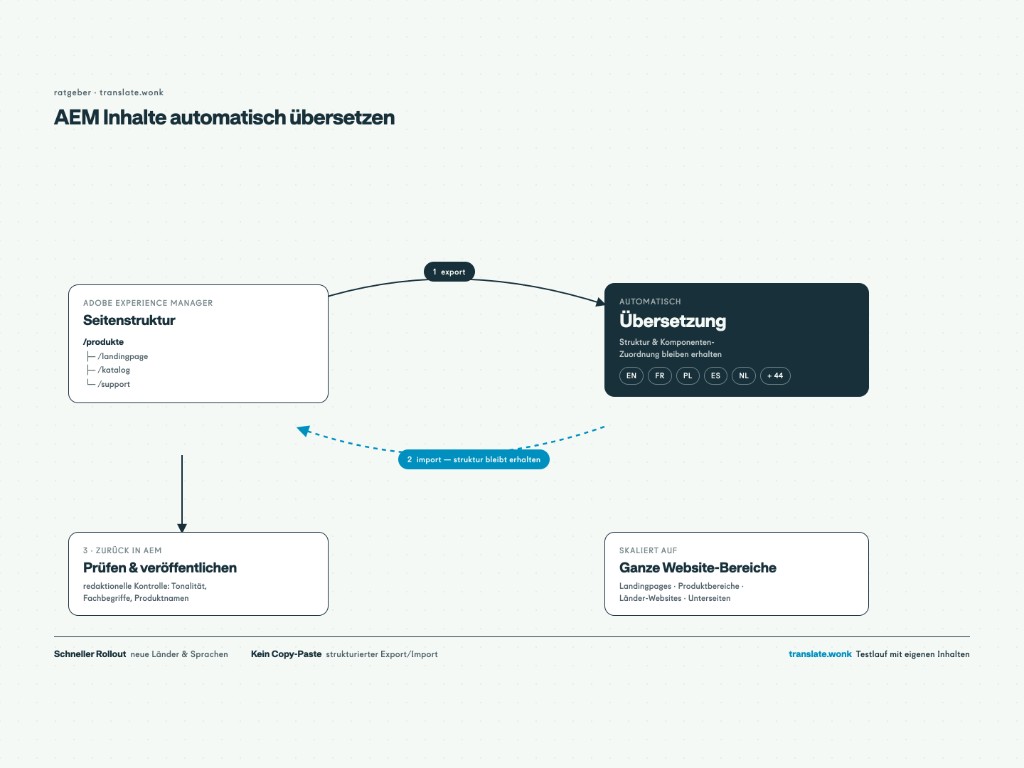
Maintaining an international website in up to 30 languages means every new page and every change must be translated and then correctly re-imported into the CMS. A globally active packaging technology manufacturer solves this with an automated process: AEM projects are exported, translated with trained language models and delivered ready for import. We found a workflow that combines speed with low integration cost for the client.
Starting point
A globally active packaging technology manufacturer runs its website on Adobe Experience Manager (AEM) and publishes content in up to 30 languages. Translation was done manually by in-house translators who were already fully occupied with day-to-day work. Rollouts regularly involve full AEM projects or large subtrees of 250,000 words or more; at that volume, manual translation plus re-import into AEM becomes the bottleneck for every new language rollout.
Approach
Translation works directly on AEM exports instead of copied single texts. The basis is language models trained on the company's glossary, dictionary and translation memory, the model behind Translate.Wonk.
Implementation
- Training language models on the company's glossary, dictionary and translation memory
- Processing full AEM project exports with page structure preserved
- Translation into up to 30 target languages, including 250,000 words or more in one run
- Delivery as import-ready projects for direct import into AEM
Result
Translation is now a fixed part of editorial work. Editorial exports from AEM, uploads projects and receives them back translated for import: three steps instead of a separate translation project with waiting times and rollout blockers per language. Entire website sections go into up to 30 languages in one run; corporate language is preserved through the trained models. In-house translators no longer translate this content themselves but review the results.
Note: Anonymised case. Client name and technical details on request.
Translating AEM without copy-and-paste: the workflow
- Export required pages or full projects from AEM
- Upload export
- Automatic translation with the trained language models
- Receive import-ready projects
- Import into AEM, review and publish
How this flow can be used for AEM installations in general is covered in Translating AEM content automatically. An overview of machine translation in corporate language is in Machine translation for business. Test run with your own content: 30-minute intro call.
Frequently asked questions
How do contents get from AEM into translation?
Via the standard AEM export. Editorial exports the required pages or full projects, uploads the files and receives them back translated and ready for import. A separate copy-and-paste translation process is no longer needed.
Is the page structure preserved during translation?
Yes. Translation works directly on exported AEM data. Structure and mapping to pages and components stay intact so content lands in the right place after import.
How does quality compare to DeepL or ChatGPT?
Language models are trained on the company's glossary, dictionary and translation memory. Terminology and product names are translated consistently instead of best-guess generic output. In the project described here, in-house translators only review results instead of translating themselves.
What happens to our data?
Processing runs on servers in Germany. Training uses only the company's own language assets (glossary, dictionary, translation memory); content does not flow into other customers' models. A data processing agreement covers the details.
Does this pay off for smaller websites or other CMS platforms?
The approach works on export files and is not limited to AEM. Whether training and automation pay off depends on volume and number of languages; a test run with your own content shows that concretely.